
Using Vaquero
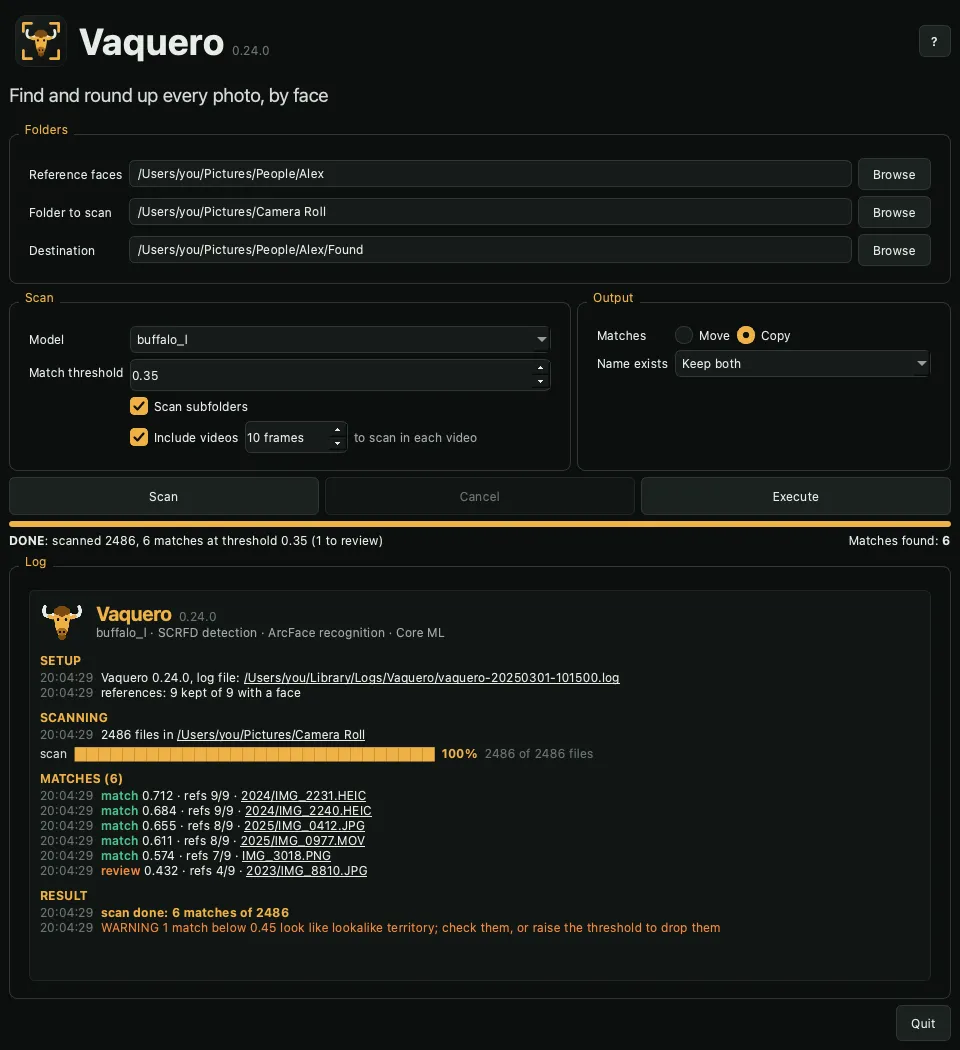
A scan, start to finish
- Reference faces: pick a folder with three to five photos of the person. See Reference photos.
- Folder to scan: pick where to look. Turn on Scan subfolders to look inside its folders too.
- Destination: pick where the matches go. It is created if missing and never scanned.
- Click Scan. Nothing moves yet.
- Check the matches in the log. Click any file name to open it.
- Choose Copy or Move, then click Execute.
Options
| Option | Default | Description |
|---|---|---|
| Reference faces | Folder of photos of the person to find | |
| Folder to scan | Folder searched for that person | |
| Destination | Where matches go; created if missing | |
| Move / Copy | Move | What Execute does with the matches |
| Name exists | Keep both | A name already in the destination: keep both, the new file numbered (IMG_1 2.png), or overwrite |
| Model | buffalo_l |
Installed model pack |
| Scan subfolders | off | Also scan subfolders; hidden folders and the destination are skipped, and matches land flat in the destination |
| Include videos | on | Also scan videos |
| Frames | 10 |
Frames sampled per video, spread evenly through it; more catch a person who appears briefly, and take longer |
| Match threshold | 0.35 |
Minimum score to count as a match |
Settings persist between launches.
File types
| Kind | Extensions |
|---|---|
| Photos | .jpg, .jpeg, .heic, .heif, .png, .webp, .tif, .tiff, .bmp |
| Videos | .mov, .mp4, .m4v, .avi, .mkv |
Other files are left alone. Hidden files and folders are skipped.
Scores and the threshold
A file's score is how closely its best-matching face resembles the person, from -1 to 1. Photos of the same person usually score 0.5 to 0.8; different people rarely pass 0.25. The default threshold is 0.35.
Matches from 0.35 to 0.45 are where hard shots (small, blurred, side-on or heavily filtered faces) and lookalikes overlap. They are logged as review in orange, clearer matches as match in green. The done line counts the review matches.
Each match also shows refs N/M: how many of the M reference photos its face matches on its own. A real match usually matches most of them (5/5); a lookalike resembles the average face but few single photos (0/5, 1/5).
Changing the threshold after a scan updates the matches without scanning again. Raise it to drop doubtful matches; lower it to catch hard shots, and check the scan report around the cutoff.
Progress and cancelling
- The progress bar tracks the model download, the scan and the copy or move. The line below it shows the count while running, then DONE or CANCELLED with a summary.
- Cancel stops a scan, copy or move after the current file. A cancelled scan keeps the results it reached, and its matches can still be copied or moved. A cancelled copy or move leaves every file either fully done and journaled or untouched.
- Closing the window during a run cancels it and waits up to 30 seconds for the current file.
The log
The log opens with the version and the engine in use, then splits into sections: Setup, Scanning, Matches, Result, then Move or Copy. Matches are green, review matches and warnings orange, errors red. Every file name is a link that opens the photo or video.
Each Scan clears the log view and starts a new log file; the copy or move that follows writes to the same file. See Files.